Mini Farm Game Online: Grow Crops, Build & Play Free Today
Played 35 times.


Play Mini Farm online free mobile PC game and enjoy farming, crops, animals, upgrades, and relaxing village gameplay anytime on your browser.
Instructions
Mini Farm Online Free Gamin Play Now.
Mini Farm is a relaxing farming game where simple village life turns into a fun and satisfying adventure. Instead of fast racing, heavy shooting, or complicated missions, this game gives you a peaceful farm, useful tasks, fresh crops, cute animals, and a steady feeling of progress. It is the kind of game you can open anytime when you want to relax, pass time, or enjoy something light and friendly.
In Mini Farm, your main goal is to grow your small farm step by step. You plant crops, collect resources, manage farm work, and unlock better upgrades as you continue playing. The gameplay is easy to understand, but it still keeps you engaged because every action helps your farm become bigger and better. Whether you are playing on mobile or PC, Mini Farm offers smooth browser-based farming fun without unnecessary pressure.
What Is Mini Farm?
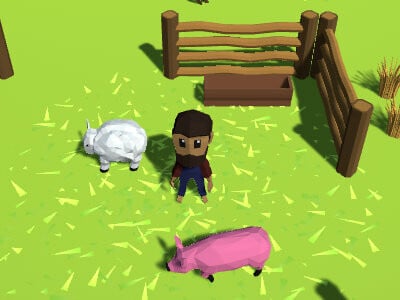
Mini Farm is an online farming game designed for players who enjoy building, growing, collecting, and managing. The game usually starts with a small piece of land, and from there, you begin your farming journey. You may plant seeds, harvest crops, take care of animals, gather coins, and use rewards to improve your farm.
The best part about Mini Farm is its simple and friendly style. You do not need advanced gaming skills to enjoy it. The controls are easy, the tasks are clear, and the farming theme feels fresh and peaceful. It is suitable for kids, casual players, and anyone who likes farm simulation games.
Why Mini Farm Is Fun to Play
Mini Farm becomes enjoyable because it gives you a strong sense of growth. At first, your farm may look small and basic. But after a few minutes of playing, you start seeing progress. Your crops grow, your resources increase, and your farm slowly becomes more active.
This type of gameplay feels rewarding because every small task matters. Planting crops, collecting items, and upgrading areas all create a smooth loop that keeps you interested. You are not just clicking randomly; you are building something of your own.
Mini Farm Gameplay Experience
The gameplay of Mini Farm is usually based on farming actions and resource management. You may need to plant crops, wait for them to grow, harvest them, and use the rewards to expand your farm. Some versions may also include animals, buildings, tools, and extra farming areas.
The game is not stressful. You can play at your own speed. There is no need to rush, and that makes Mini Farm perfect for short breaks. You can enjoy a few minutes of farming or continue longer if you want to grow your farm faster.
Key Features of Mini Farm
Mini Farm includes many features that make it enjoyable for casual players:
Relaxing Farming Theme
The farm setting gives the game a calm and positive feeling. Green fields, crops, animals, and village-style tasks make the gameplay peaceful and enjoyable.
Easy Controls
Mini Farm is simple to control on both mobile and PC. You can play using touch controls on a phone or mouse controls on a computer.
Crop Growing and Harvesting
Planting and harvesting crops is one of the main parts of the game. It gives you regular rewards and keeps the gameplay active.
Farm Upgrades
As you earn more coins or resources, you can improve your farm. Upgrades make progress faster and help you unlock more fun.
Mobile-Friendly Gameplay
Mini Farm works well as an online free mobile PC game, which means you can enjoy it on different devices without complicated setup.
How to Play Mini Farm
Mini Farm is very easy to start. The game is made for quick understanding, so even new players can enjoy it without confusion.
Instructions
-
Start the game and look at your available farm area.
-
Plant crops or complete the first farming task shown on the screen.
-
Wait for crops to grow and collect them when they are ready.
-
Earn coins, points, or resources from your farming work.
-
Use your rewards to upgrade your farm, tools, crops, or buildings.
-
Unlock new areas or farming items as you progress.
-
Keep farming, collecting, and improving your land to build a better Mini Farm.
Best Tips to Grow Faster in Mini Farm
To make faster progress, focus on regular harvesting. Do not leave ready crops waiting for too long because harvesting is usually the main source of income. The more often you collect, the faster your farm grows.
Another useful tip is to spend your rewards wisely. Instead of using coins randomly, upgrade the parts of your farm that help you earn more. Better crops, improved tools, or useful buildings can make your farming journey smoother.
Also, keep an eye on new unlocks. Many farming games reward players with new features after reaching certain progress levels. Unlocking these areas can make your farm more profitable and interesting.
Why Mini Farm Is Good for Mobile and PC Players
Mini Farm is a great choice because it fits both mobile and PC gaming styles. On mobile, it is easy to tap and play during free time. On PC, the larger screen gives a better view of the farm and makes management more comfortable.
Since the game can be played online, you do not need to download a heavy app. This makes Mini Farm a good option for players who want quick farming fun directly in the browser.
Is Mini Farm Good for Kids?
Yes, Mini Farm is generally a kid-friendly game because the theme is peaceful, simple, and positive. Farming games often teach basic planning, patience, and resource use in an enjoyable way. The content is usually safe and suitable for casual family-friendly gaming pages.
For AdSense-friendly websites, Mini Farm is also a good topic because it avoids harmful or adult themes. The game is light, clean, and easy to describe in a family-safe way.
Why You Should Play Mini Farm
You should play Mini Farm if you enjoy relaxing games where progress feels satisfying. It is not about fighting or pressure. It is about growing something slowly and watching your small farm become better over time.
The game is perfect for players who like farming, village life, crops, animals, upgrades, and casual simulation gameplay. It gives you a peaceful break from busy daily life while still offering enough tasks to stay interesting.
Final Thoughts
Mini Farm is a simple but charming farming game that delivers relaxing online gameplay for mobile and PC users. With easy controls, crop harvesting, farm upgrades, and peaceful village-style progress, it is a great choice for casual players. Whether you play for a few minutes or enjoy a longer farming session, Mini Farm gives you a clean, fun, and satisfying experience.
If you like farm simulation games, Mini Farm is worth playing. Start small, grow your crops, collect rewards, and turn your little farm into a beautiful and productive place.
FAQ About Mini Farm
What is Mini Farm?
Mini Farm is an online farming game where players grow crops, collect resources, upgrade the farm, and enjoy relaxing village-style gameplay.
Can I play Mini Farm online for free?
Yes, Mini Farm can be played online for free on supported gaming websites without needing a heavy download.
Is Mini Farm a mobile-friendly game?
Yes, Mini Farm is mobile-friendly and can also be played on PC, making it suitable for both phone and desktop users.
What type of game is Mini Farm?
Mini Farm is a casual farming simulation game. It focuses on growing crops, managing resources, and upgrading your farm.
Is Mini Farm good for kids?
Yes, Mini Farm is generally suitable for kids because it has a peaceful farming theme, simple controls, and family-friendly gameplay.
How do I progress faster in Mini Farm?
To progress faster, harvest crops regularly, use coins wisely, upgrade useful farm items, and unlock new areas whenever possible.
Categories Comments